
Build for the Shop Floor, Not Just the CAD Screen
Wall thickness, draft angles, bend reliefs, the geometry decisions that drive 80% of quote escalation. Catch them before tooling release
CNC Design Best Practices
For full CNC capabilities, see CNC Machining →
Design Around Tool Access
DFM does not start when the supplier opens the quote. It starts when the drawing is still editable. Once tooling is cut, fixtures are built, or first-article inspection runs, every change costs real money and lead time. The guidelines below catch the geometry decisions that drive the highest rework rates we see at quote stage, sharp internal corners, walls too thin to machine, pockets deeper than the tool can reach, bends placed too close to holes
Design Around Tool Access, what to do
Specific rules to apply before releasing a CNC drawing:
• Internal corner radius ≥ 1/3 of the pocket depth. Smaller radii force smaller end mills, which run slower and deflect more. R3 mm and R6 mm match standard tool sizes, match the radius to the tool, not the other way around.
• Pocket depth-to-width ratio under 3:1 for the cutting tool. A pocket 30 mm deep needs at least 10 mm wide for a standard tool. Beyond 4:1, the shop runs extended-reach tools at reduced feeds, cycle time can climb 4–5×.
• Minimum wall thickness: 0.8 mm for metals, 1.5 mm for plastics. Below that, walls chatter, warp, or break under cutter pressure. Aluminum 6061 holds 1.0 mm walls cleanly; stainless and titanium need 1.5–2.5 mm for the same height.
• Hole depth-to-diameter under 4:1 for standard drills. Deeper holes need peck drilling, gun drilling, or EDM flag these on the drawing before the shop assumes a standard cycle.
• Thread length 1.5× to 2× nominal diameter for blind holes. Specifying full-depth threading in a blind hole adds tap breakage risk and tap regrinds, with no functional benefit past 2×D.
• Avoid undercuts on three-axis parts. Each undercut adds a setup or a custom tool. If the geometry needs one, design it for a standard T-slot cutter, not a custom form tool.


Injection Mold Design
See Rapid Injection Molding Services →
Keep Wall Thickness Consistent
Wall thickness governs flow length, cooling time, and shrinkage. Thicker sections cool slower, shrink more, and pull the surface inward, that is what causes sink marks on the show face. Thin sections cool first and lock in stress around the thick areas, which is where warp and weld lines appear.
Target ranges by material:
• ABS, PC, PP, PE: 1.2 mm to 3.0 mm. 2.0 mm is the typical default for consumer enclosures.
• Glass-filled nylon and PBT: 0.75 mm to 2.5 mm, these flow shorter and need closer gates.
• PMMA and PC optical parts: 1.5 mm to 3.5 mm, held tight on uniformity to keep refractive index even.
Design rules around the wall:
• Hold wall thickness within ±10% across the part. A 2.0 mm wall stepping to 3.0 mm at a boss base creates a sink mark on the opposite face guaranteed.
• Step transitions over a length of at least 3× the thickness change. Sharp steps create flow hesitation and visible knit lines.
• Rib thickness: 40–60% of the adjoining wall for cosmetic parts, up to 80% for structural-only parts. A rib at 100% of the wall thickness will sink visibly on a polished surface.
• Boss outer wall: 40–60% of the main wall. Solid bosses cool like thick sections and pull sink onto adjacent surfaces. Hollow the boss and add ribs for stiffness.
• Internal corner radius: at least 0.5× the wall thickness. Sharp internal corners concentrate stress and crack under load, especially in PC and ABS
Draft Angles
Add draft on every vertical wall, every rib, every boss. Without draft, the part drags on ejection and scratches the cosmetic surface.
• Standard draft: 1° per side. 2° is safer for textured surfaces and matte finishes.
• Ribs: 0.5° per side for ribs under 3 mm tall, 1° for ribs 3-5 mm, 1.5° beyond that.
• Bosses: 0.5–1.5° external, 0.5° internal. Hold the internal draft tight to keep the screw or insert engagement consistent.
• Textured surfaces add their own draft requirement on top.Mold-Tech MT-11010 needs about 1.5° additional draft; deeper textures need 3°+


Sheet Metal Design
Start With Bending and Flat Pattern Logic
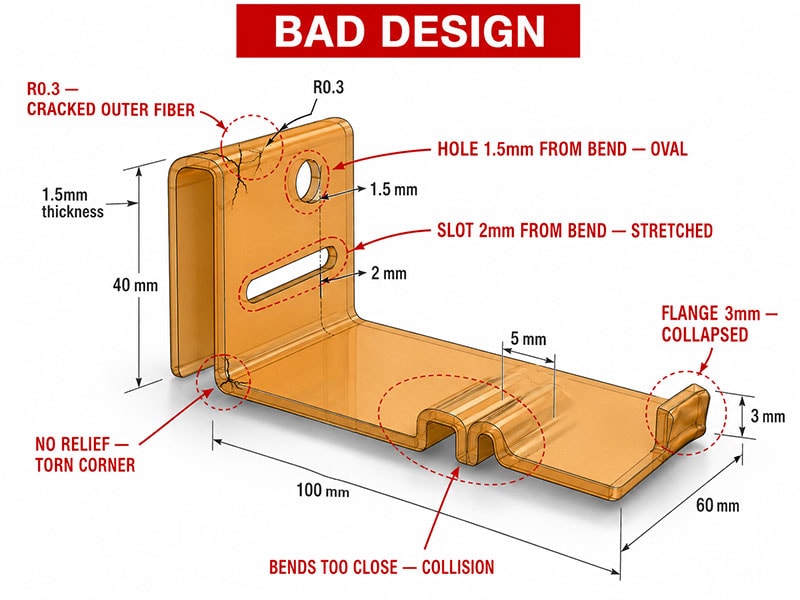
Sheet metal design starts with the flat pattern and bend sequence. Once the part is bent, holes shift, flanges spring back, and features that looked clean in CAD interfere with the press brake tooling. The rules below catch the violations we see most often during DFM review.
Bend radius
• Inside bend radius ≥ 1× material thickness for mild steel and 5052 aluminum.
• 6061-T6 aluminum cracks under tight bends, use 2× to 3× thickness, or anneal before bending.
• 304/316 stainless: 1× to 1.5× thickness for standard tempers. Grain direction matters, bends across the grain crack at half the radius bends along the grain can hold.
• For 1.0 mm material, a radius below R0.5 forces coining instead of air bending, different tooling, different cost.
Flange length and hole distance
• Minimum flange length: 4× material thickness. A 1.0 mm sheet needs at least 4 mm of flange to clear the V-die. Below that, the flange will not form cleanly or will collapse during bending.
• Hole-to-bend distance: at least 2× material thickness from the hole edge to the bend tangent line. Closer, and the hole deforms from round to oval during forming.
• Slot-to-bend distance: 2.5× thickness from the slot end to the bend, since slots stretch more than holes.
• Distance between two opposing bends: at least 5× thickness in the flat section, or the tooling will collide on the second bend.
Bend reliefs
• Add a bend relief notch at every partial-width bend. Width = material thickness, depth ≥ 1.5× thickness.
• Without relief, the corner tears at the bend tangent, common failure on 304 stainless brackets.
Tolerances
• Default to ISO 2768-m for sheet metal. Hole position ±0.2 mm, bend angle ±1°, flange length ±0.3 mm.
• Tighter than ±0.1 mm on a bent feature requires post-bend machining or secondary operations. Specify only where assembly demands it, a ±0.05 mm callout on a non-critical flange can double the part cost.

Assembly Design
Parts that machine, mold, and bend cleanly still fail at assembly. The pattern is consistent across the assemblies we review: no locating features, every screw doing alignment and clamping at the same time, tolerance stacks that the inspector cannot trace back to a datum, and joining methods chosen by habit instead of fit. Assembly DFM happens at the drawing stage, not at the build review
Start With Datum and Locating Features
Every assembly needs three things on the drawing before fasteners are placed: a primary datum face, a locating pin or boss to set X-Y position, and a secondary feature to lock rotation. Without all three, the assembly relies on the fastener clearance to find position, which means it lands within ±0.4 mm of nominal at best, and shifts every build.
Practical implementation:
• Two dowel pins (or one pin + one slot) on opposing corners. Pin-pin locates and over-constrains rotation; pin-slot locates and constrains rotation without binding on tolerance stack.
• Recessed pockets or scallops on the mating part for the dowel heads, sized H7/h6 for a slip fit (about 0.013 mm clearance on a 6 mm pin).
• Screw clearance holes oversize by 0.4–0.8 mm against the fastener so the screws clamp, not locate. M3 screws → Ø3.4 mm clearance; M4 → Ø4.5 mm.
• Datum face large enough to seat flat against the mating surface, at least 4× the largest dimension across the locating features
Joining method selection
• Threaded inserts (heat-set or press-in) for plastic parts that will be opened more than 3 times. Self-tapping screws strip after 5–8 cycles in ABS, faster in PC.
• Bolted joints for metal-on-metal assemblies that need field service. Add a captive washer or a flange-head bolt to prevent loosening from vibration.
• Snap fits for one-piece consumer enclosures that do not need to be opened. Design the cantilever beam to deflect within the material’s elastic strain limit, about 1.5% for ABS, 0.9% for PC.
• Adhesive bonding for cosmetic seams or low-load joints. Surface prep is the cost driver, not the adhesive, plasma or chemical etching adds 30–90 seconds per part.


Cost Optimization Strategies
Cost optimization starts before quoting. Five drivers account for most price escalation we see at RFQ:
• Geometry that runs slow: pockets beyond 3:1 depth, internal radii smaller than R3 mm, walls under 1.0 mm. Each one cuts feed rate and adds finishing passes.
• Tolerances tighter than the function needs. ISO 2768-m (±0.1 mm at 30 mm) is free; ±0.025 mm doubles inspection time and often forces a grinding or reaming pass after milling.
• Material over-specification. 7075 quoted for parts 6061 would carry.. 316L quoted for indoor parts that never see chloride. PEEK quoted for parts running below 100°C. Material accounts for 20–40% of the part cost; the upgrade rarely changes function.
• Surface finish over-specification. Ra 0.4 µm on a non-cosmetic face adds a polishing pass at 30–60% labor cost over Ra 1.6 µm. Specify Ra by face, not by part.
• Production plan that does not match the order quantity. A 50-piece run quoted as one-off doubles the per-part price; a 5-piece run quoted as production wastes the tooling amortization. Tell the supplier the realistic annual volume up front.
Two changes that catch most of the savings:
• Default everything to ISO 2768-m, then call out the 2–4 features that genuinely need tighter control.
• Specify cosmetic finish only where the user can see it. Internal pockets, mating faces, and back surfaces stay as-machined

Get DFM Feedback Before You Quote
Upload your STEP file. We review the geometry, flag the problem features, and return a DFM report with your quote within 12 hours.
Failure Prevention Guidelines
Failures show up at inspection but start at the drawing. The patterns repeat across processes:
• Sharp internal corners crack under cyclic load. CNC parts cracked at the corner radius callout we left at R0.2; molded parts cracked where the rib met the wall at zero radius. Both fixed by adding a fillet at 0.5× wall thickness.
• Heat-treated parts grow during aging. 17-4PH stainless aged to H900 grows about 0.0005 in/in. Hold critical bores after heat treat, not before, or expect the size to drift past tolerance.
• Coatings stack on fit-critical features. A 25 µm anodize layer on a Ø10 H7 bore takes it out of size. Mask the bore or specify the dimension after coating.
• Welded assemblies warp from heat input. A 200 mm welded steel frame moves 0.5–1.5 mm from welding stress. Either machine after welding, add stress relief, or design the part so the bend tolerance is field-adjustable.
• Drawings that ask for ±0.025 mm on a 600 mm length. No process holds that across that length. Either dimension from a closer datum, or accept that the part needs grinding or post-machining inspection.
The pattern is consistent: failures trace back to a drawing decision that ignored the process. Design review with the supplier before tooling release catches most of these, pull the supplier into the second design review, not the first quote.