

Dewey Wu General Manager & senior mechanical engineer at EPOC CRAFTER, 15 years in design engineering, quality, and metallurgy. Hands-on across CNC machining, metalwork, sheet metal, and prototyping (subtractive + 3D printing).
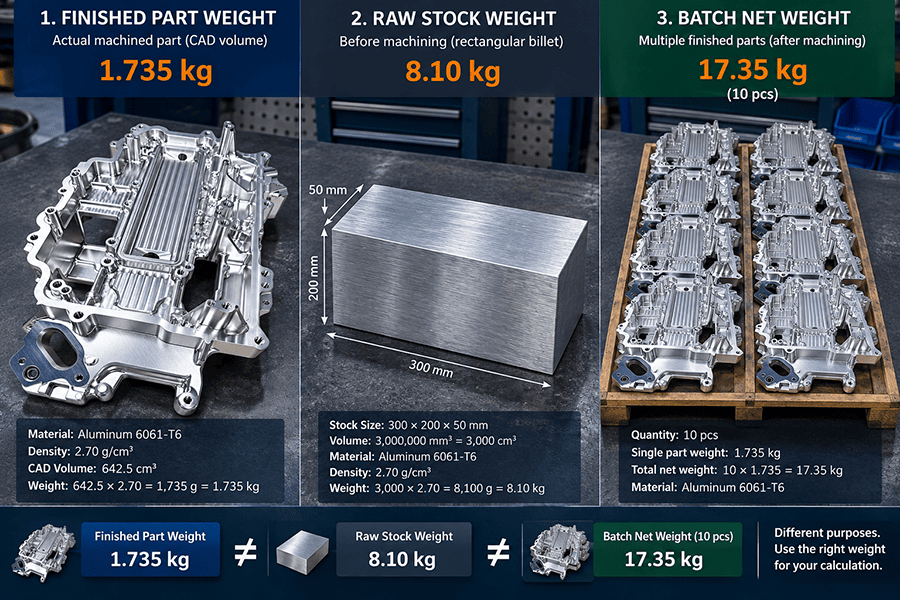
A CNC part can have three different useful weights. Finished part weight comes from the final geometry. Raw stock weight comes from the billet, plate, bar, or tube the supplier will buy. Batch net weight multiplies the relevant single-part value by quantity, while packaging stays separate. The CNC part weight calculator on this page uses volume and material density to keep those numbers distinct. For simple shapes, dimensions are enough. For a pocketed housing or manifold, use the finished CAD solid volume. This metal weight calculator is for RFQ planning, material estimates, and product mass checks. It is not a CNC quote calculator or a carrier shipping cost calculator, because machining time, setup, tolerance, inspection, finishing, packaging, and carrier rules require additional inputs.
1. One CNC Part Can Have Three Useful Weights
Finished part weight is the mass of the modeled component after machining. Raw stock weight is the mass of the starting billet, plate, bar, or tube. Batch net weight is the finished or stock value multiplied by quantity, depending on what you are planning. The numbers answer different questions, so an unlabeled “part weight” field is ambiguous in an RFQ.
1.1 Finished Part Weight Comes from Final Geometry
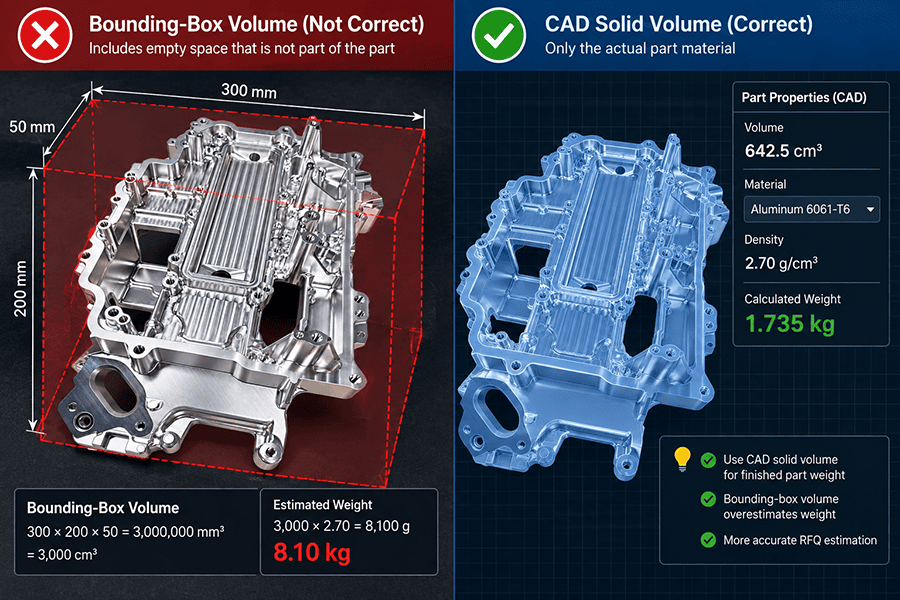
Use finished geometry when the decision concerns assembly mass, handling, product weight, or the net mass of the machined component. A rectangular block or simple shaft can be calculated from dimensions. A housing, bracket, manifold, or impeller with pockets and bores should use finished CAD solid volume instead of its outside bounding box.
1.2 Raw Stock Weight Starts with the Purchased Blank
Use stock dimensions when estimating the material represented by one machining blank. Saw allowance, facing stock, workholding, stock availability, and datum preparation can make the purchased blank larger than the finished part. There is no responsible universal percentage to add. The allowance belongs to the actual process plan and supplier quote.
For geometry that drives excess stock or difficult workholding, use the DFM design guidelines for CNC geometry before treating a material weight estimate as a purchasing number.
1.3 Batch Weight Depends on the Single-Part Basis
Finished part weight multiplied by quantity gives batch net mass. Raw stock weight multiplied by quantity gives a rough starting-material mass only when each part uses the same blank. Plate nesting, standard bar lengths, offcut reuse, and stock optimization can change the actual purchase quantity. Packaging adds another layer, so batch net mass is not automatically packed shipment weight.
2. How to Calculate CNC Part Weight from Volume and Density
The weight formula is simple: mass equals volume multiplied by density. Most errors come from using the wrong geometry or mixing units. To get mass from volume in metric units, keep volume and density compatible through the full calculation.
| Metric formula: Weight (kg) = Volume (mm³) × Density (g/cm³) ÷ 1,000,000. For volume in cm³, divide by 1,000 instead. |
| Imperial formula: Weight (lb) = Volume (in³) × Density (lb/in³). |
A finished CAD volume of 125,000 mm³ in Al 6061 uses a nominal 6061 density of 2.70 g/cm³. The metal weight calculation is 125,000 × 2.70 ÷ 1,000,000 = 0.3375 kg, or 0.338 kg after rounding. This is a calculated example, not EPOC CRAFTER shop-floor data. A volume weight calculator or density weight calculator should retain more precision internally and round only the displayed result.
A CAD system is usually a better part volume calculator for irregular geometry than a manual metal volume calculator built from many subtraction steps. For simple blocks and bars, hand formulas remain useful as a reasonableness check.
3. Metal Density Chart for Common CNC Materials
This metal density table uses grade-specific reference values because the density of metals is not identical across an entire material family. The material density chart is suitable for RFQ estimates and calculator presets, not as a lot-specific acceptance requirement. Where a supplier provides project-specific engineering material density data, that value should override the preset.
For strength, hardness, and density in the same comparison, use the CNC metal strength and density chart.
| Al 6061 | 2.70 | 2,700 | 0.098 | The Aluminum Association, nominal density |
| Al 7075 | 2.81 | 2,810 | 0.101 | The Aluminum Association, nominal density |
| AISI 1018 | 7.87 | 7,870 | 0.284 | MatWeb engineering reference |
| AISI 1045 | 7.87 | 7,870 | 0.284 | MatWeb engineering reference |
| AISI 4140 | 7.85 | 7,850 | 0.284 | Sandvik wrought-material reference |
| 304 stainless steel | 7.90 | 7,900 | 0.285 | Outokumpu Core 304/4301 |
| 316L stainless steel | 8.00 | 8,000 | 0.289 | Outokumpu Supra 316L/4404 |
| C11000 copper | 8.91 | 8,910 | 0.322 | Copper Development Association, 68°F |
| C36000 brass | 8.50 | 8,500 | 0.307 | Copper Development Association, 68°F |
| Ti-6Al-4V Grade 5 | 4.42 | 4,420 | 0.160 | TIMETAL 6-4, 22°C |
3.1 Aluminum Density and Weight
For density of aluminum, grade matters. The Aluminum Association lists 6061 density at 2.70 g/cm³ and 7075 density at 2.81 g/cm³. A 6061 aluminum density preset should therefore remain separate from a 7075 aluminum density preset. UK-facing references may use aluminium density or density of aluminium; the spelling changes, not the physical property.
Density does not decide the alloy by itself. The 6061 vs 7075 aluminum comparison covers the strength, machinability, finish, and cost conditions that belong to material selection.
An aluminum weight calculator should use the selected alloy value rather than a generic family value. A 6061 weight calculator uses the 6061 preset; an aluminium weight calculator for a UK audience should follow the same grade-specific rule.
3.2 Steel and Stainless Steel Density and Weight
For density of steel, 7.85–7.87 g/cm³ is a practical nominal range for the carbon and alloy grades in this table. Keep 1018 steel density, 1045 steel density, and 4140 steel density as separate presets so the source remains traceable. The density of stainless steel also varies by grade: Outokumpu lists 304 density at 7.90 g/cm³ and 316L density at 8.00 g/cm³. A user checking the density of 304 stainless steel or density of 316 stainless steel should see the grade row, not a generic steel value.
For condition and selection differences among the carbon and alloy grades, use the 4140 vs 1018 vs 1045 steel guide.
The same calculator can act as a steel weight calculator, steel bar weight calculator, or stainless steel weight calculator by switching the material preset. The density columns already provide steel density in kg/m³ and lb/in³ without a separate conversion step.
3.3 Copper and Brass Density and Weight
The density of copper is higher than the other materials in this table. C11000 copper density is 8.91 g/cm³, while the density of brass C36000 is 8.50 g/cm³. The Copper Development Association reports C11000 at 0.322 lb/in³ at 68°F and C36000 at 0.307 lb/in³. A copper weight calculator or brass weight calculator should use the selected alloy row, not one shared copper-alloy value.
3.4 Titanium Density and Weight
The density of titanium depends on alloy. TIMET lists Ti-6Al-4V density at 4.42 g/cm³ at 22°C, equivalent to 0.160 lb/in³. This grade 5 titanium density is much lower than 304 or 316L stainless steel for equal volume, but titanium weight alone does not predict raw material price or machining cost. A titanium weight calculator answers mass, not process economics.
4. Metal Weight Calculator by Part Shape
Use a formula only when the stock or finished geometry is genuinely simple. The formulas below are the basis of a plate weight calculator, bar weight calculator, round bar weight calculator, cylinder weight calculator, and block weight calculator. They do not add saw allowance, cleanup stock, or fixture tabs automatically.
| Rectangular block or plate | L × W × T | Length, width, thickness | Billet, block, plate, or sheet |
| Round bar or cylinder | πD²L / 4 | Diameter, length | Shafts, pins, turned blanks |
| Square bar | S²L | Side length, length | Square stock |
| Hex bar | (√3 / 2) × AF² × L | Across flats, length | Hex fittings and standoffs |
| Round tube | π(OD² − ID²)L / 4 | OD, ID, length | Hollow round stock |
| Rectangular tube | (WH − wh)L | Outer and inner width/height | Hollow rectangular stock |
4.1 Rectangular Block and Plate Weight
For a 150 mm × 100 mm × 25 mm Al 6061 blank, volume is 375,000 mm³. At 2.70 g/cm³, stock weight is 1.0125 kg, rounded to 1.013 kg. A plate weight calculator or metal plate weight calculator uses this same three-dimension formula. A rectangular block weight calculator or metal block weight calculator does as well. The 1.013 kg result is raw blank mass unless the finished part is actually a solid block of those dimensions.
4.2 Round Bar, Rod, and Cylinder Weight
For a solid round bar, volume is πD²L / 4. A 40 mm diameter × 100 mm long steel blank has a volume of 125,664 mm³. At 7.85 g/cm³, the calculated steel weight is 0.986 kg. A round bar weight calculator or metal rod weight calculator uses the same geometry. Changing only the density preset turns the calculation into an aluminum bar weight calculator or steel bar weight calculator.
4.3 Tube and Hollow Section Weight
For round tube, subtract the inner-cylinder volume from the outer cylinder. For rectangular tube, subtract inner cross-sectional area from outer area before multiplying by length. Treating the outside diameter as solid can materially overstate a thin-wall tube weight.
5. Complex CNC Parts: Use CAD Volume
A bounding box reports the envelope around a part, not the solid material left after pockets, bores, slots, and cavities are machined. For complex CNC part weight, use the finished solid volume from the controlled STEP or native CAD model. Confirm that the imported STEP resolves as the intended solid body and does not include fixtures, stock envelopes, duplicate bodies, or unrelated assembly components.
The reliable workflow is: read finished solid volume from the controlled model, confirm the material grade from the drawing or RFQ, apply the sourced material density, and label the result as theoretical weight until the physical part is weighed. CAD volume still does not define the purchased billet size. Finished mass and raw stock mass remain separate calculations.
6. Why Part Weight Matters for CNC Machining Quotes, Material Cost, and Shipping
Weight is useful in a CNC RFQ when it is tied to the right decision. Purchased stock weight supports a material cost baseline. Finished part weight supports product mass and batch net weight. Packed shipment weight requires packaging as well. A shipping weight calculator or freight weight calculator therefore needs more than part geometry, and this page does not estimate carrier rates or CNC shipping cost.
Material is only one line in a quote. The CNC machining materials guide explains why machinability, cycle time, tooling, setup, inspection, and finishing can move machined part cost independently of weight.
For a rough material cost calculation, multiply purchased stock weight by the known material price per kilogram or pound. Do not multiply finished weight by material price when the supplier must buy a much larger billet. The result is a material-cost baseline, not total CNC machining cost.
Quantity changes the batch calculation and can also change nesting or stock purchasing. For repeated small batches, low-volume production planning provides the wider production context that a part weight estimate cannot capture.
Engineering judgment: A heavier part is not automatically more expensive to machine. A simple heavy plate can require less machine time than a lighter thin-wall housing with several setups, small features, tight tolerances, and added inspection.
7. Why Calculated Weight Can Differ from the Scale
A theoretical mass can be mathematically correct and still differ from a scale reading. Check the boundary of the object first: the CAD model may exclude inserts, bushings, fasteners, labels, or coatings, while the physical part may include them. Revision mismatch can also produce a precise answer for the wrong geometry.
| Density source | Calculator presets are nominal references, not a measured density for every material lot. |
| CAD revision | Use the same controlled revision as the drawing and RFQ. |
| Model content | Confirm holes, pockets, inserts, and assembly components match the object being weighed. |
| Rounding | Keep precision through the calculation and round the final displayed result. |
| Scale method | Resolution, calibration, tare, and whether the part is bare or assembled affect the measurement. |
Use the calculator for RFQ-stage mass estimates, material planning, early assembly mass budgeting, and batch net weight. Use an actual scale when shipping documents, final product mass acceptance, balance, inertia, or another requirement depends on the manufactured part itself. Calculated weight is a planning value. Actual weight is a measurement.
8. Questions Engineers Ask Before Sending the RFQ
8.1 How Do I Calculate CNC Part Weight from a STEP File?
Import the STEP file, confirm it forms the intended solid body, and read the finished solid volume. Then calculate part weight from volume and the density of the specified material grade. Do not rely on a generic CAD material assignment when the drawing specifies a grade such as Al 6061-T6 or SS 316L.
8.2 What Is the Formula for Metal Weight?
Metal weight equals volume multiplied by density. In metric units, weight in kilograms equals volume in mm³ multiplied by density in g/cm³, divided by 1,000,000. For a mass calculation, the same relationship lets you derive mass from volume or calculate weight from volume once density is known.
8.3 Should a CNC RFQ Use Finished-Part Weight or Raw-Stock Weight?
Use finished-part weight for product and assembly mass. Use raw-stock weight for the billet, plate, bar, or tube represented by the machining plan. A CNC machining RFQ may benefit from both, but neither replaces the STEP model, drawing, material specification, quantity, finish, and inspection requirements.
8.4 Does Part Weight Affect CNC Machining Cost?
Yes, but weight alone cannot calculate a CNC machining quote. Stock weight influences material cost and finished mass influences handling or logistics. Geometry, removal volume, tool access, setup count, material machinability, tolerance, inspection, finish, and quantity can dominate the quote.
8.5 How Accurate Is a Metal Weight Calculator?
A metal weight calculator provides a theoretical estimate based on geometry and the density entered. For ordinary RFQ planning, sourced nominal values are appropriate. For a mass-controlled finished product, verify the completed part on a suitable scale and record the model revision, material grade, density used, and measurement condition.
For the next step after a part weight estimate, review EPOC CRAFTER’s CNC machining capabilities and send the controlled CAD model, drawing, material grade, quantity, finish, and inspection requirements with the RFQ.
Ready to Quote Your CNC Prototype?
Upload your STEP file and get a DFM review + quote within 12 hours.
No tooling cost. Minimum 1 part.